Find
The Find panel searches your entire world for specific items, tiles, walls, or sprites.
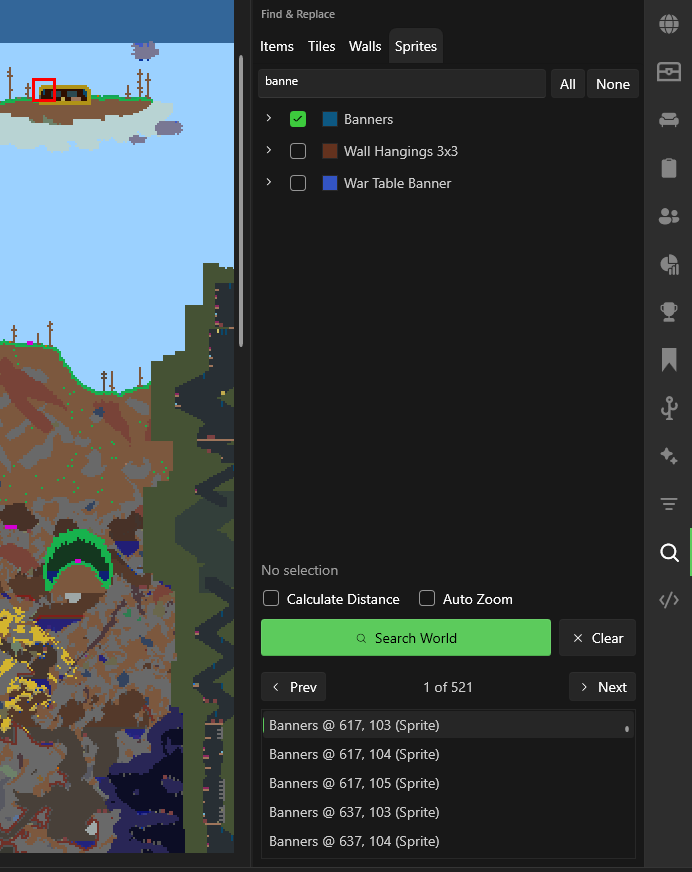
Search Tabs
| Tab | What it searches |
|---|---|
| Items | Items inside chests |
| Tiles | Placed tile types |
| Walls | Wall types |
| Sprites | Multi-tile furniture and objects |
How to Use
- Select a tab (Items, Tiles, Walls, Sprites)
- Pick or type what you're looking for
- Click Search World
- Results appear in the list below (up to 1,000 results)
Highlight Overlay
When a search completes, TEdit automatically highlights the results on the map. Non-matching tiles are darkened and desaturated (using the same shader as the Filter panel Darken mode), so matching tiles visually pop out. A crosshair marks the currently selected result.
The overlay clears when you start a new search or clear the results.
Navigation
- Prev / Next — Jump between results on the map. A result counter shows your current position (e.g., "3 of 47").
- Auto Zoom on Navigate — When enabled, automatically zooms to each result when navigating (off by default — just pans).
- Calculate Distance — Sorts results by distance from spawn and displays the distance alongside each result.
tip
Use Find to locate all chests containing a specific item, or to count how many of a certain tile type exist in your world.