Sprites
The Sprites panel lets you browse and place furniture, decorations, and other multi-tile objects.
How to Use
- Select the Sprite tool from the toolbar (
T) - Open the Sprites sidebar panel
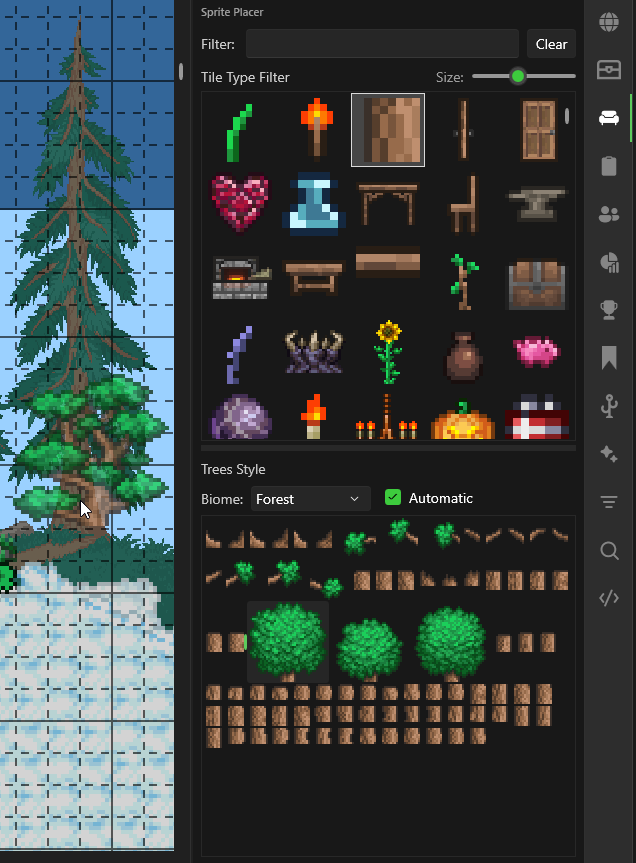
- Pick a tile type from the dropdown (e.g., Chairs, Tables, Torches)
- Use the filter box to search by name
- Select a style from the grid
- Left-click on the map to place it
Drawing Sprites
- Single sprites — Left-click to place one at a time
- 1x1 sprites (grasses, platforms) — Click and drag to draw in strokes, just like the Pencil tool. Supports horizontal (right-click drag) and vertical (left+right drag) line drawing.
Thumbnail Size
Use the thumbnail size slider at the top of the sprite grid to adjust how large the sprite previews appear. Drag right for larger thumbnails (easier to identify sprites visually) or left for smaller thumbnails (more sprites visible at once).
The slider setting is saved between sessions.
Biome Variants
Some sprites have biome-specific variants (e.g., trees, plants, vines). When a sprite type has variants, the panel displays them grouped by biome. Select the biome tab or variant group to see all available styles for that biome.
Banners & Bestiary
Additional browsing panels for banners and bestiary data: